
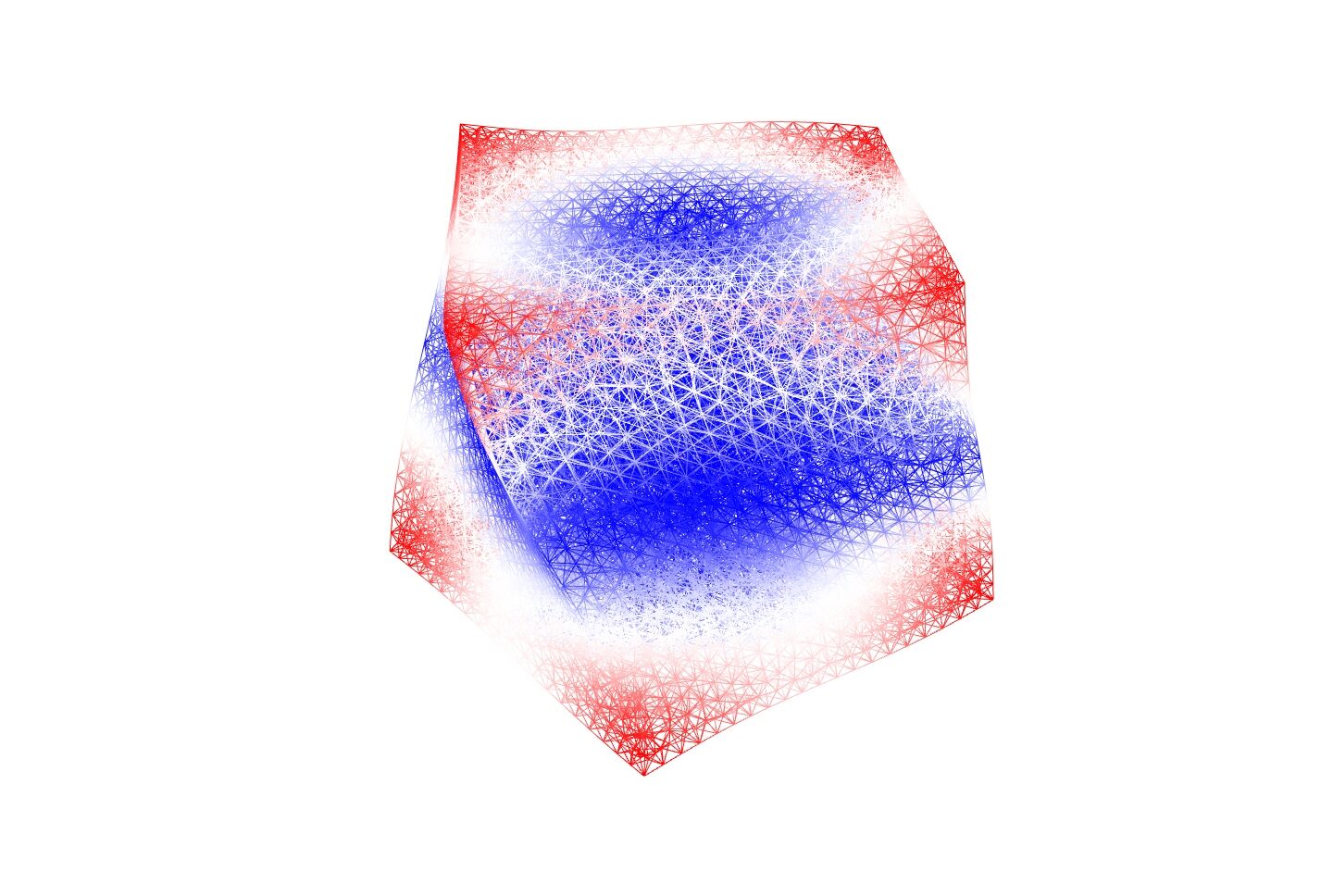
はじめに
本記事では下記のような読者を想定し、3~4章程度の構成を予定しています。
- Rhinoceros+Grasshopperに興味がある方
- Rhinoceros+Grasshopperを使う上で内部処理に関する理解を深めたい方
- Rhinoceros+Grasshopperを業務/研究/趣味などのために独自拡張して使いたい方
- メタマテリアルを設計して遊びたい方
2章である本記事では、Grasshopperを自ら拡張していくのに理解すべきだが包括的に解説されているのを見ない部分(全体像から内部処理まで)を理解することを目的とします。
素晴らしい学習コンテンツが多く存在しているので、基本的なことはそちらを参照いただく前提で踏み込んだ説明を主とします。
実装に近い話をするので、何かしらのプログラミング言語、できればC#を知っているとより読みやすいかと思います。
Grasshopperとは?
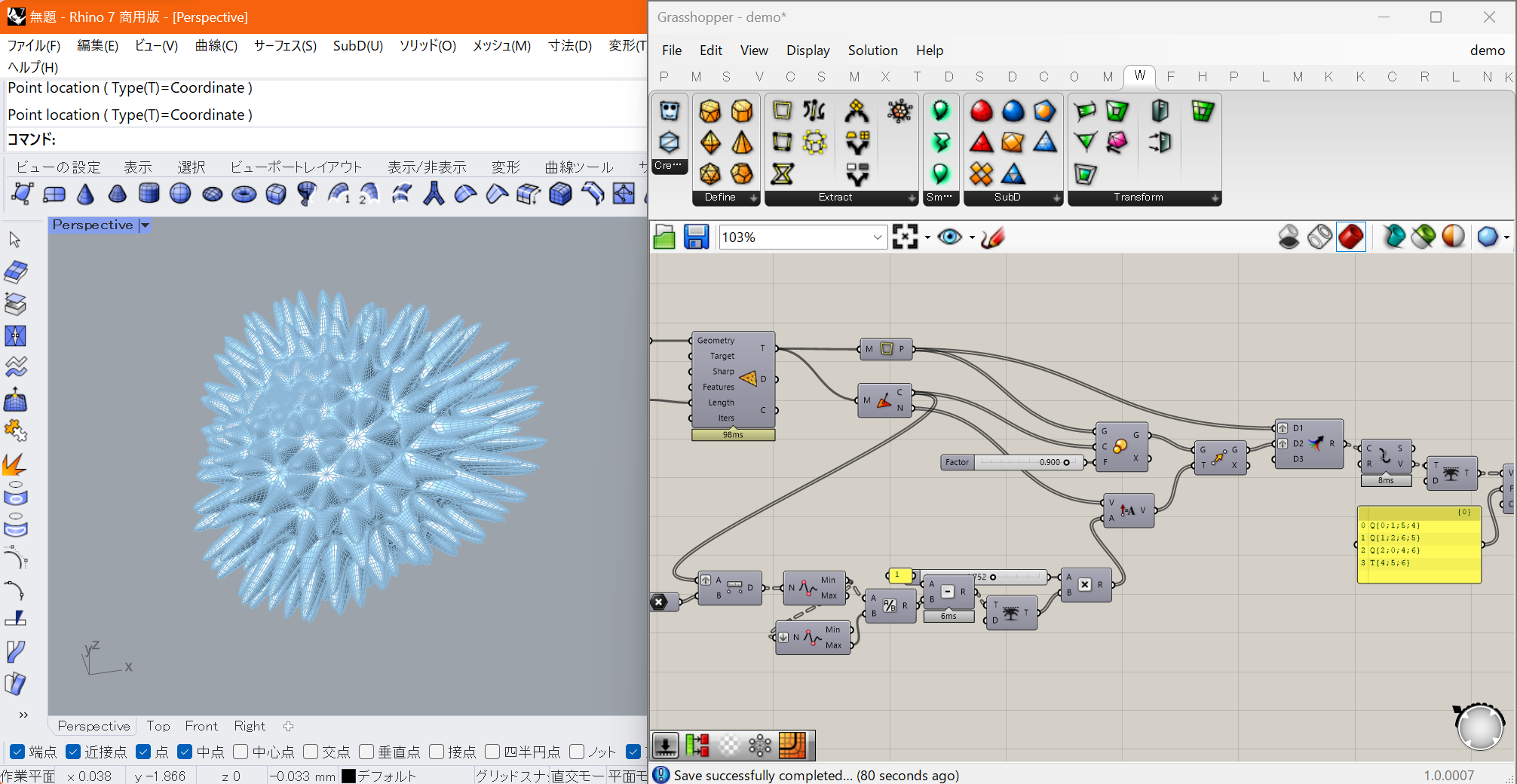
Rhinocerosは前章で述べた通り3DCADですが、Grasshopperはそれにデフォルトで付属したプラグインです。
ノードエディタというビジュアルプログラミング環境を用いて、Rhinoだけでは難しいプログラムでコントロールされた複雑/高度な処理が実現可能です。
雑な説明としては、入力を受け取り処理を行い出力を吐き出すコンポーネント(ノード)を繋げていくことで、そのネットワークの接続関係上手前にあるコンポーネントから順に実行していくものになります。
Grasshopperのうれしさとは?
Grasshopperを使うことの嬉しさは多岐に渡りますが、実際何が嬉しいのかが分からず(かつ妙に複雑なUIのスクショなどを見て)学習の二の足を踏んでいる方もよく見ます。
可能な限り要素分解して紹介をしていきます。
ノーコードで複雑な処理が実現可能
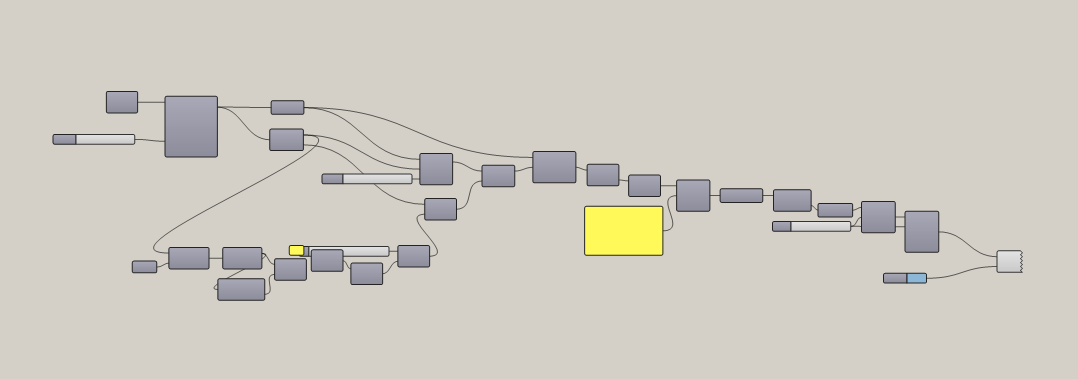
ノードエディタ自体の解説はWikiなどに譲りますが、ノードエディタであることに加え後述する細かい仕様によりプログラムを書かずとも複雑な処理を実現することができます。
独特のデータ構造とアルゴリズムにより直感的かつ複雑な処理構築を可能にしているもののその副作用として独特の理解しづらさもあり、そこを乗り越えることが一つの学習障壁かと思います。
注意点として、Grasshopperはノードの接続関係におけるループの存在を許容しないため直接的には再帰処理が出来ない(!)のですが、後述するデータ構造と処理ルールで再帰処理にあたるような処理を可能にしています。
パラメトリックな処理構築が可能
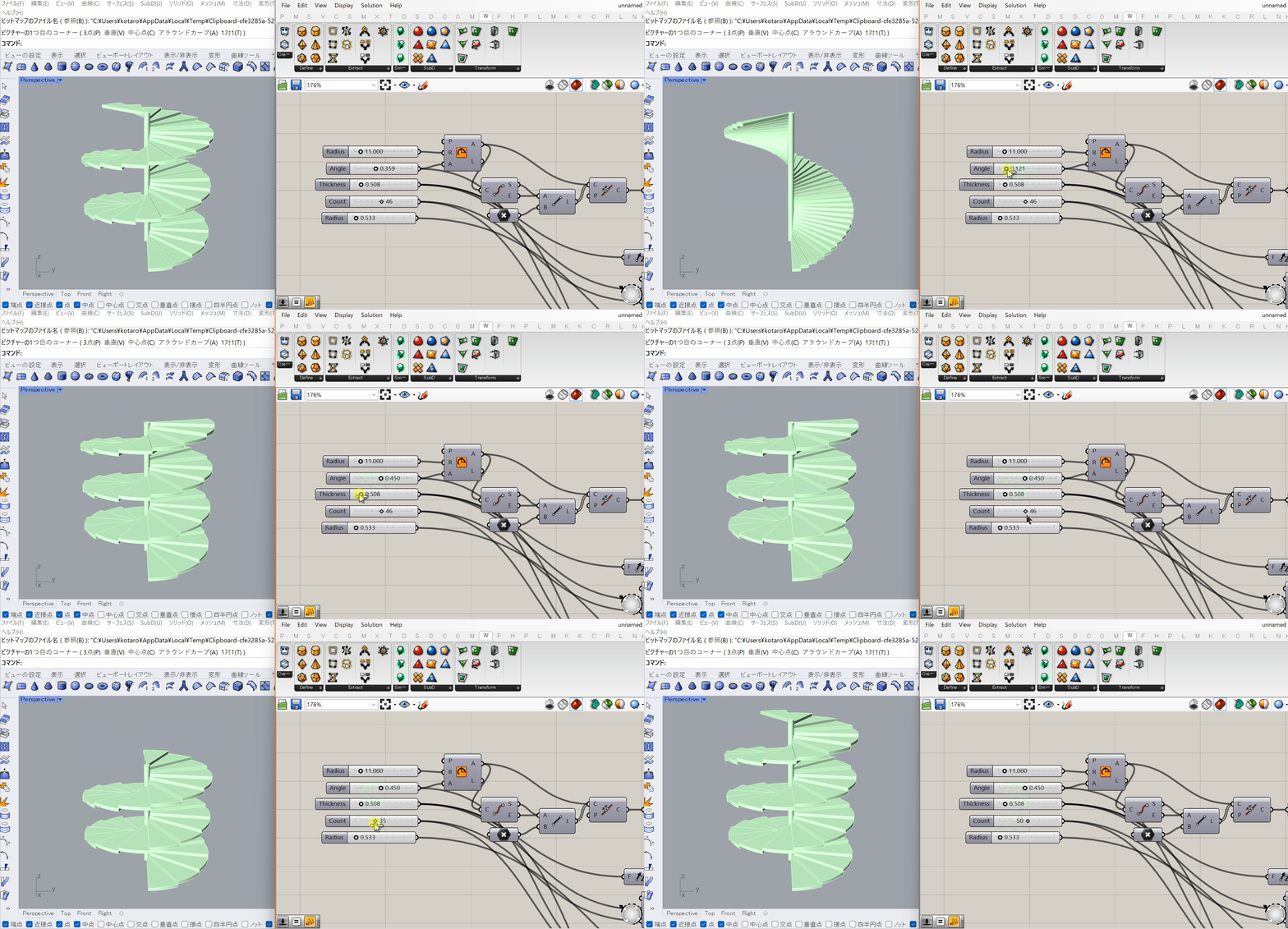
前章で述べた通り、Rhinoはヒストリーを原則的に持たないCADであるため、過去に行った処理のパラメータを後から変更することが原則的に出来ません。
それに対しGrasshopperではパラメータを含む処理のネットワークが構築されるため、パラメータを更新する度にそれが反映された処理が再度実行されます。
Rhinoでインタラクティブに行われる精密な形状編集のようなものはGrasshopperには適していない(ものすごく頑張れば可能)なのですが、
- 検証段階での形状検討
- 最適化を見据えた形状生成
といったパラメータを後から変更したい用途には非常に強力です。
大量/複雑な処理が可能
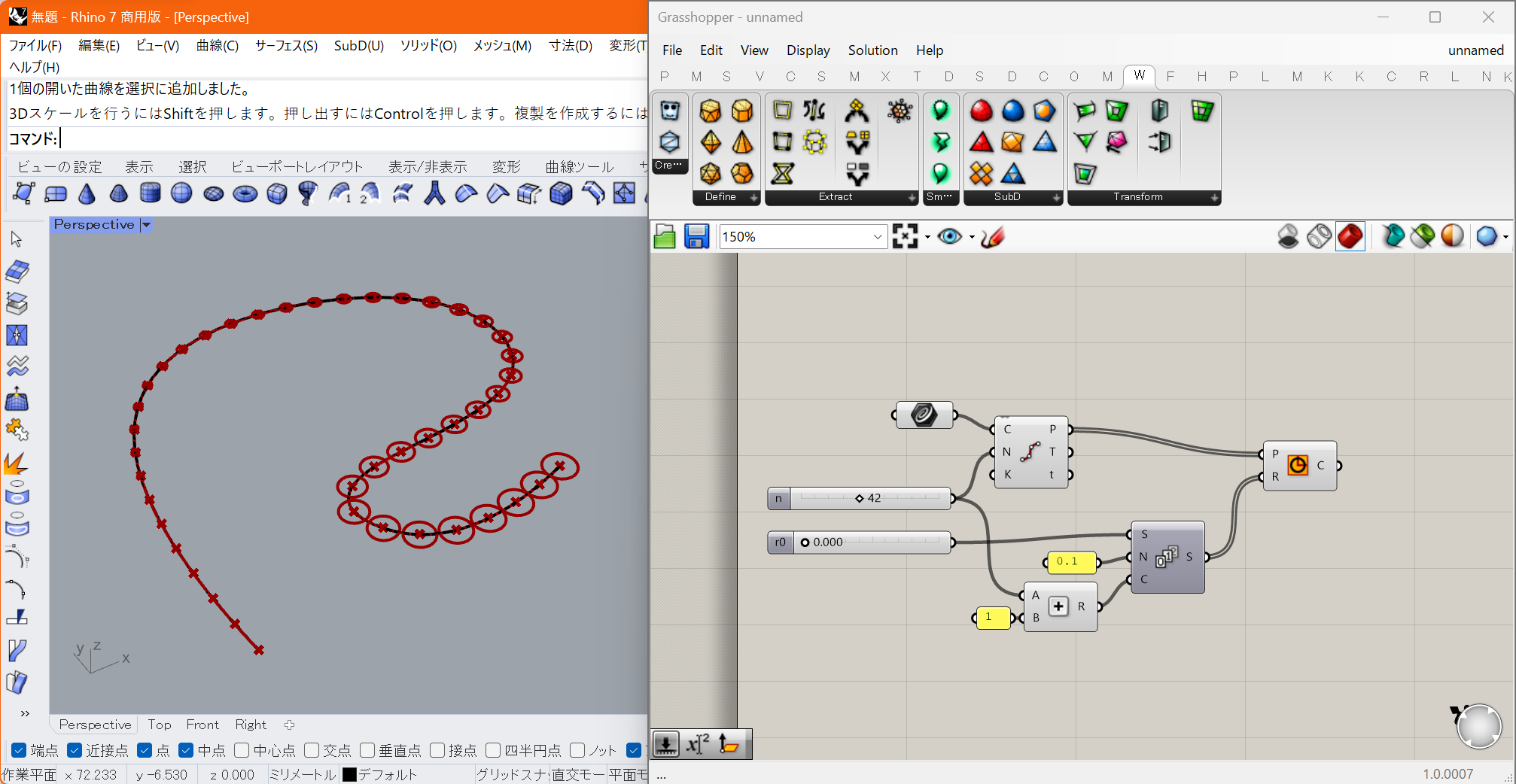
デフォルトでGrashopperから実行できる一つ一つの処理はRhino上でも行えるものが殆どです。
では「与えられた曲線をn等分して得られた各点p_iに、半径がr0+0.1*iである円を作成する」といった処理をRhinoで手作業で行うことは可能でしょうか?
「DivideコマンドでCurveからn+1個の点を得た後、半径を0.1ずつ増やしながらCircleコマンドをn+1回実行する」
ことで実現できますが、気が遠くなります。Grasshopperではコンポーネントを4個程度使えばこれが実現でき、かつ各変数は後から変更可能となります。さらに複雑な例についても同様です。うれしい。
資産の再利用が容易
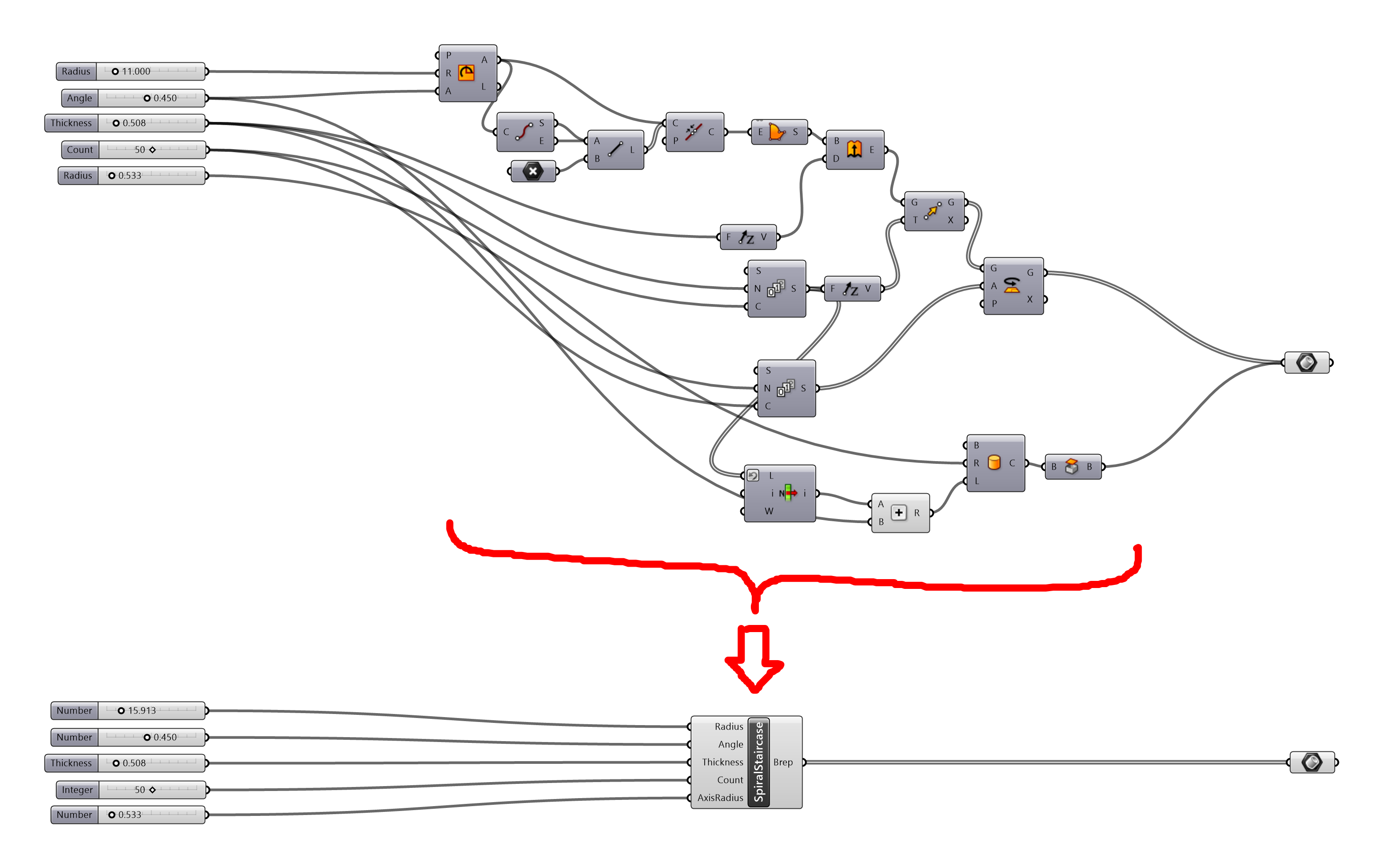
Grasshopperでは、作成した一連の処理やファイルそのものに対して入出力を定義してあげることで、それをノードとして再利用可能にする仕組みが提供されています。
チームでの協働やよく使う処理のモジュール化などに有用です。
拡張性、活発なコミュニティ

前章でRhinoについて述べたのと同様に柔軟な拡張性が担保されており、様々な資産がForumやFood4Rhinoといったコミュニティで活発に公開されています。
基本的にはC#で開発されるアドオンで様々な拡張が可能となり、外部ライブラリの利用も可能です。
また、Grasshopper上ではノードの組み合わせにより処理の構築が行われるためアドオン同士の組み合わせにより業界・技術領域を横断した様々な応用が日々生まれています。
Grasshopperを理解する
Grasshopperを理解する①:基本構成要素
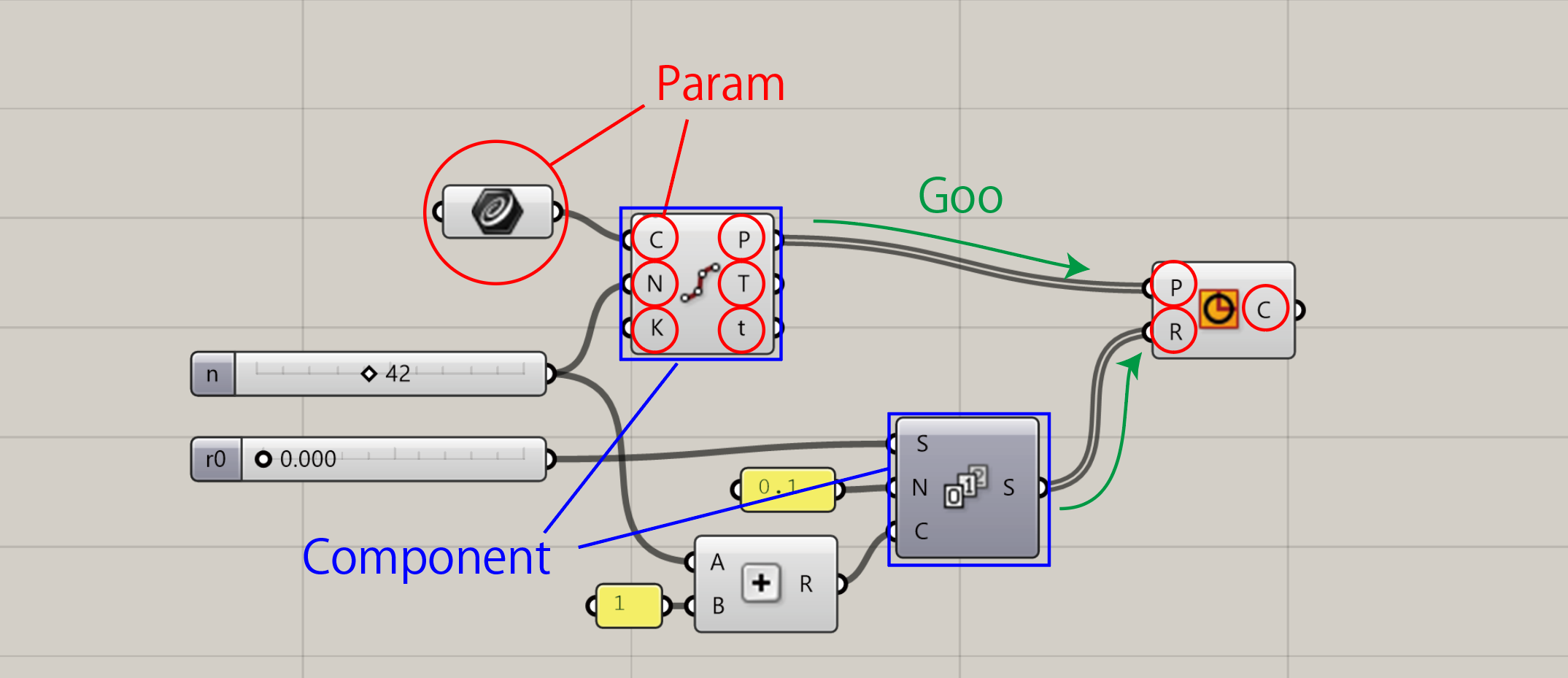
Grasshopperで行われている処理を理解するために重要なのは
- Goo
- Param
- Component
の3つの構成要素であり、一言で説明するとGrasshopperは
- データを保持したGooを
- Gooをあるデータ構造で保持可能なParamを介して受け渡ししながら
- Componentで処理を実行
しています。3つについて解説します。
これら3つの機能および関係性を理解することで、Grasshoperで行われている処理の全体像の見通しが立つはずです。
Goo
GH_Goo<T>やGH_GeometricGoo<T>といったIGH_Goo<T>インターフェースを実装する抽象クラスを継承したもので、Grasshopper内で扱いたい型をTに指定したGooクラスを実装することで、Grasshopper内でのハンドリングのための機能を提供する型Tのラッパークラスとして機能します。
Gooが持っている機能は以下です。
- T型の値の保持と外部からのアクセス機能
値のGH_GooおよびGH_GeometricGooはジェネリクスで指定した型の値をm_valueフィールドで保持しており、Fieldプロパティでアクセスが可能です。 - 他のGoo及びクラスとの間での相互変換機能
CastToメソッドおよびCastFromメソッドを実装することで、異なるGoo間での型変換機能を提供することが可能です。
これによりGrasshopperでは、異なる型同士の変換を明示的に意識することなく処理を構築することが可能となっています。
(例:コンポーネントのdouble値を期待する入力ポートにintegerの値を接続しても、内部的にはGH_Intger(GH_Goo<int>)がCastToメソッドを介してGH_Number(GH_Goo<double>)に変換されている) - 形状の変換機能(GH_GeometricGoo<T>)
RhinoおよびGrasshopperでは、アフィン変換をはじめとする形状の変換が多く行われます。
TransformメソッドおよびMorphメソッドを実装することで、デフォルトでサポートされていない形状データをRhinoおよびGrasshopperの様々な形状変換機能に対応させることが可能となります。
Param
GH_Param<T>やGH_PersistentParam<T>など、IGH_Param<T>インターフェースを実装する抽象クラスを継承(TはGooに制約されている)したもので、1つないし複数のGooをGH_Structure<T>というデータ構造で保持し、コンポーネント間を受け渡していくことが主な機能になります。
非直感的ですが、画像における赤丸で示されているものはすべてParamであり、UI上での扱いに
- Floating:UI上自身がコンポーネントと同様入出力を持ちGooの受け渡しを行う
- Input:Componentの入力ポートとして機能しGooの受け渡しを行う
- Output:Componentの出力ポートとして機能しGooの受け渡しを行う
の3種類があります。基本的にはInputとOutputとして機能しているものという認識で問題はありません。
Component
ノードエディタにおけるノードで、基本的にはGH_Componentクラスを継承して実装されます。入力Paramから受け渡される情報を適切な組み合わせで実処理メソッドSolveInstranceに受け渡し、処理結果を出力Paramに適切なデータ構造で受け渡します。
Grasshopperを理解する②:処理の流れとGH_Structure
Grasshopperの学習の一番のハードルとよく言われるのが、Paramの情報保持に用いられるデータ構造であるGH_Structure<T>で、このデータ構造とあるルールでComponentの挙動が決定されます。
基本的にDataTreeなどとツリー構造になぞらえて説明されることが多いのですが、それによる誤解や理解しづらさがあると個人的には思っているので、内部処理に近い具体的な説明をしてみます。
GH_Structureとは?
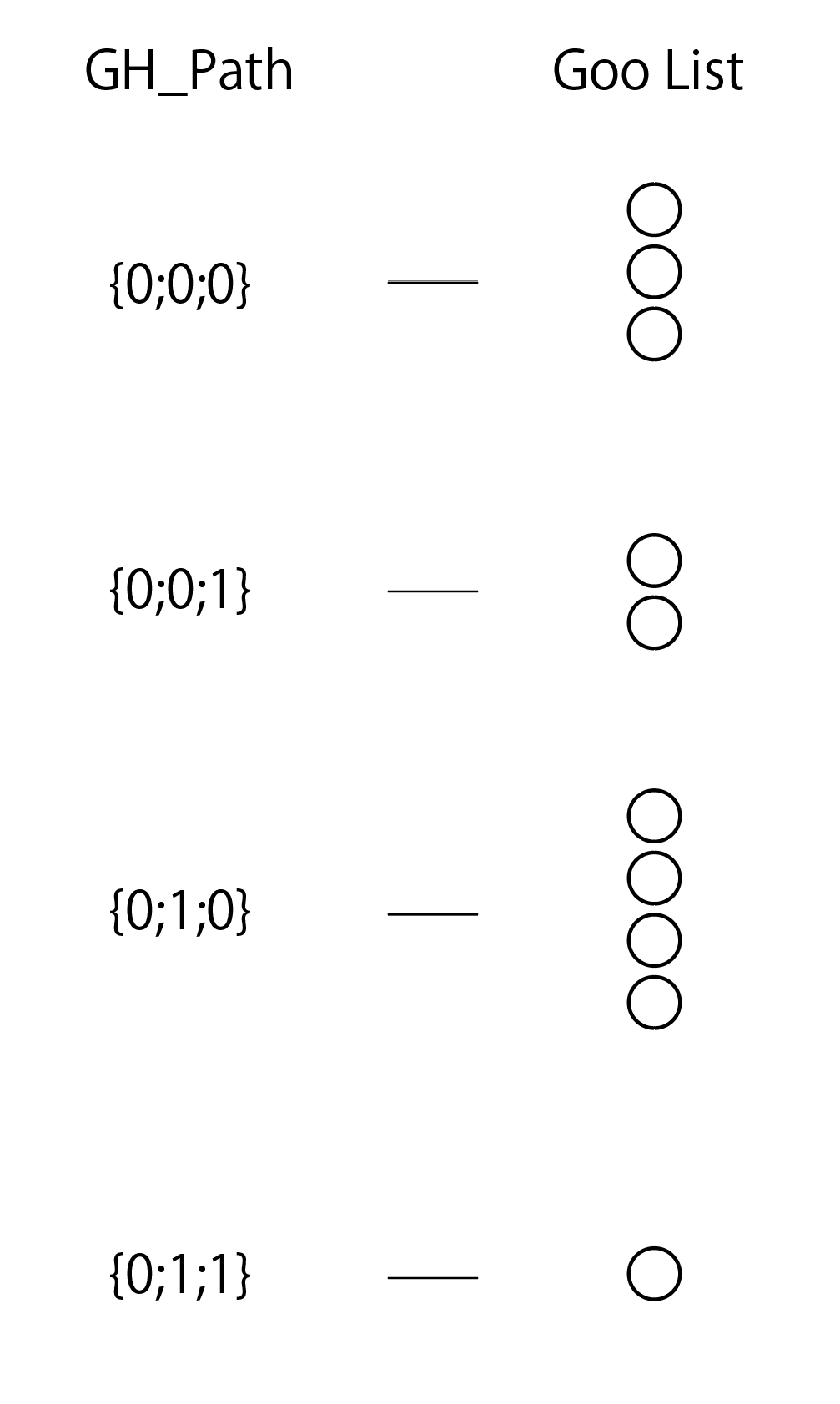
まず、GH_Structureを一言でいうと「GH_Path({0;0;1}のように整数値を複数並べたもの)をキーとしてGooのリストを保持している、GH_Pathにより順序付けされたdictionaryのようなもの」です。
GH_Pathは、左の整数値から順に大小を比較していくことで順序付けが可能です。
例:{0;0;0} < {0;0;1} < {0;1;0} < {1;0;0}
Component内でのGH_Structureの扱い
Componentは、各入力Paramの
- GH_Structure
- データアクセス設定(詳細は後述)
- item:GH_Structure内のGooを1個ずつSolveInstanceに渡す
- list:GH_Structure内で1つのGH_Pathと対応しているGooのリストをSolveInstanceに渡す
- tree:GH_Structure自体をつSolveInstanceに渡す
をもとに、あるルールでどのような入力値の組み合わせ方でSolveInstanceメソッドを実行するかを決定し処理を行い結果を出力します。
ルールは以下です(データアクセスがtreeのケースは単純かつあまり無いのでitemとlistについて記述します)。説明の方法はいくつかあると思いますが、理解しやすく且つ誤解の生まれない説明を試みます。
⓪前提
- 各入力ParamのGH_Structureは、GH_PathをキーとしてGooのリスト(このGooのリストを以下便宜的にブランチと呼びます)を保持しており、それはGH_Pathにより昇順にソートされている
- 入力Paramごとにデータアクセス設定がitemまたはlistに設定されている
- 入力Paramはそれぞれ異なるブランチ数(=キーとなるGH_Path数)、ブランチ内のアイテム数を持っていてもよい
①各入力ParamのGH_Structureのブランチ同士の対応付けを行う
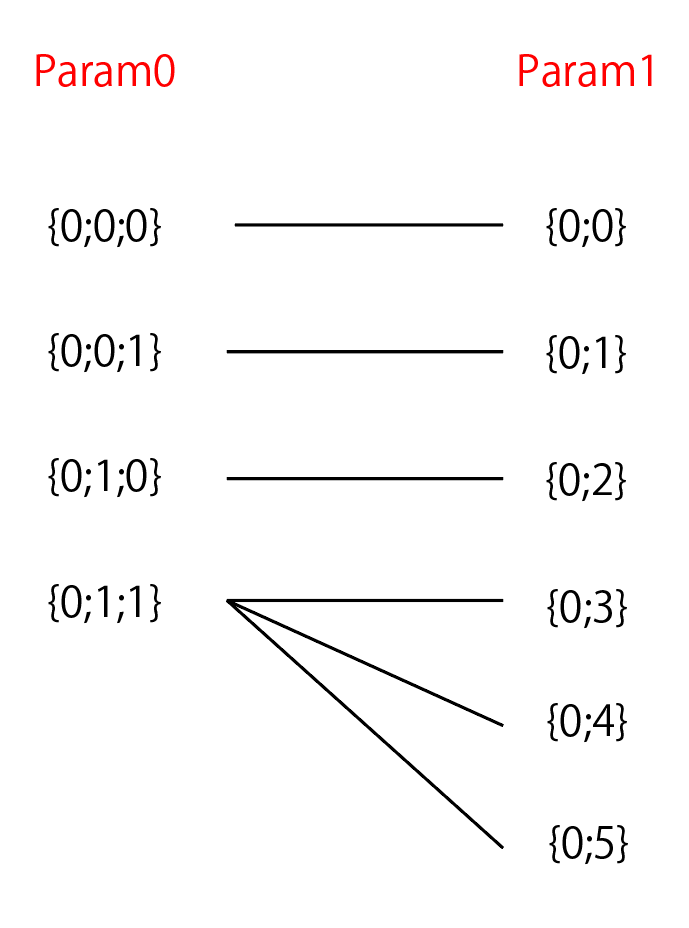
「それぞれのGH_Structureからn番目のブランチを取ってくる。ブランチ数がn個以下の場合は、末尾のブランチを取ってくる」というルールでGH_Structure間のブランチ同士の対応付けを行います。便宜的に以下ブランチセットと呼びます。
結果として、最もブランチ数が大きなGH_Structureのブランチ数分のブランチセットが定義されます。
②ブランチ内のGooを、SolveInstanceに渡す単位に分割する
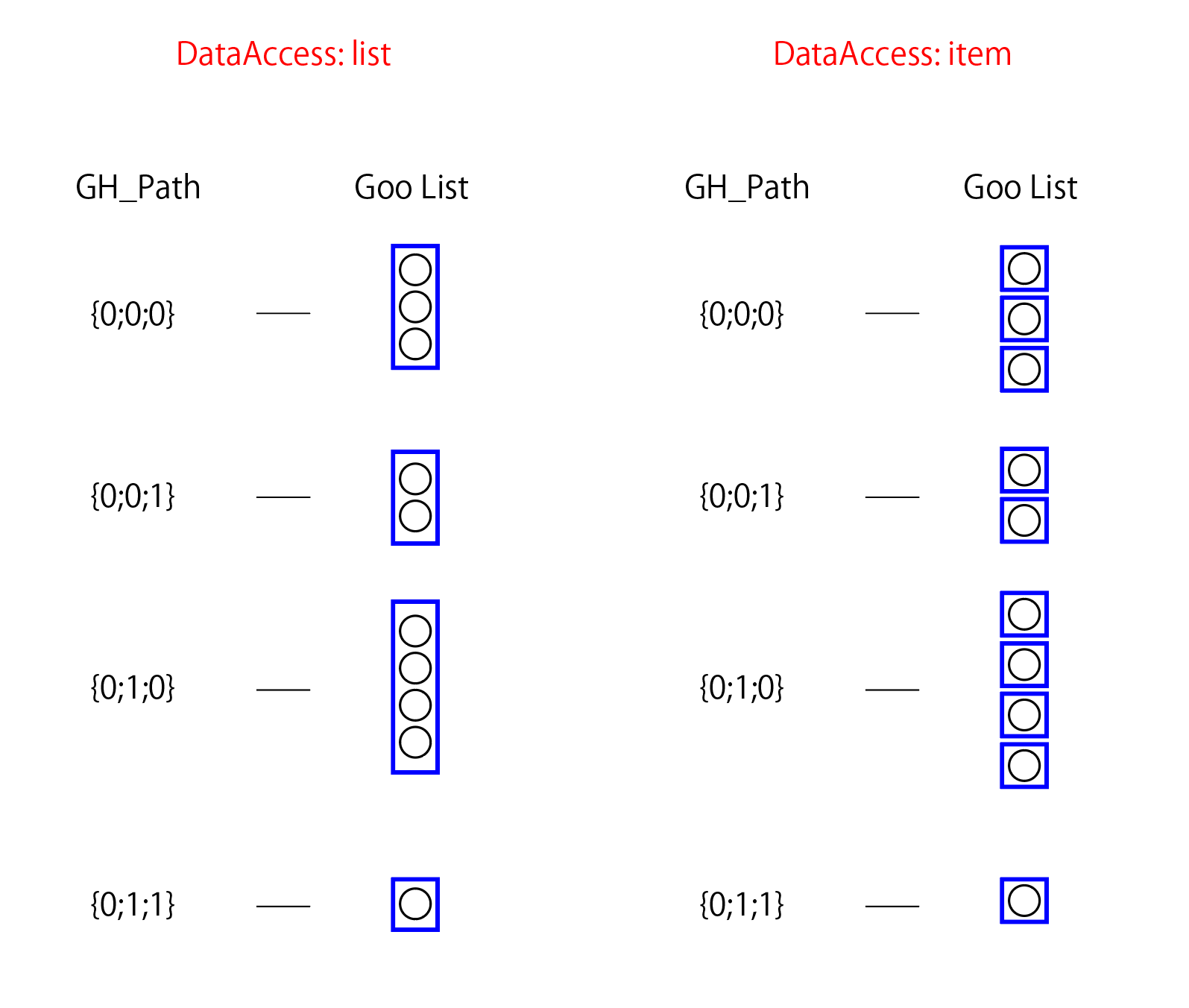
ブランチセット内の各ブランチに対して、「データアクセスがlistの場合はブランチ内の全Gooのリストを処理単位とする。データアクセスがitemの場合は、ブランチ内の各Gooを1個ずつ処理単位とする」というルールで処理の単位を定義します。
結果として、listの場合は1つの処理単位が出来ますが、itemの場合はブランチ内の要素数分の処理単位が出来ます。
③処理単位同士の対応をとる

ここまでで、ブランチセットが定義され、ブランチセット内の各ブランチに対して処理単位が定義されました。ここに対し、
「各ブランチからn番目の処理単位を取ってくる。ブランチ内の処理単位数がn個以下の場合、末尾の処理単位を取ってくる」
というルールで処理単位同士の対応を取ります。この組み合わせが晴れてSolveInstanceに渡される値の組み合わせとなります。
処理全体像の例
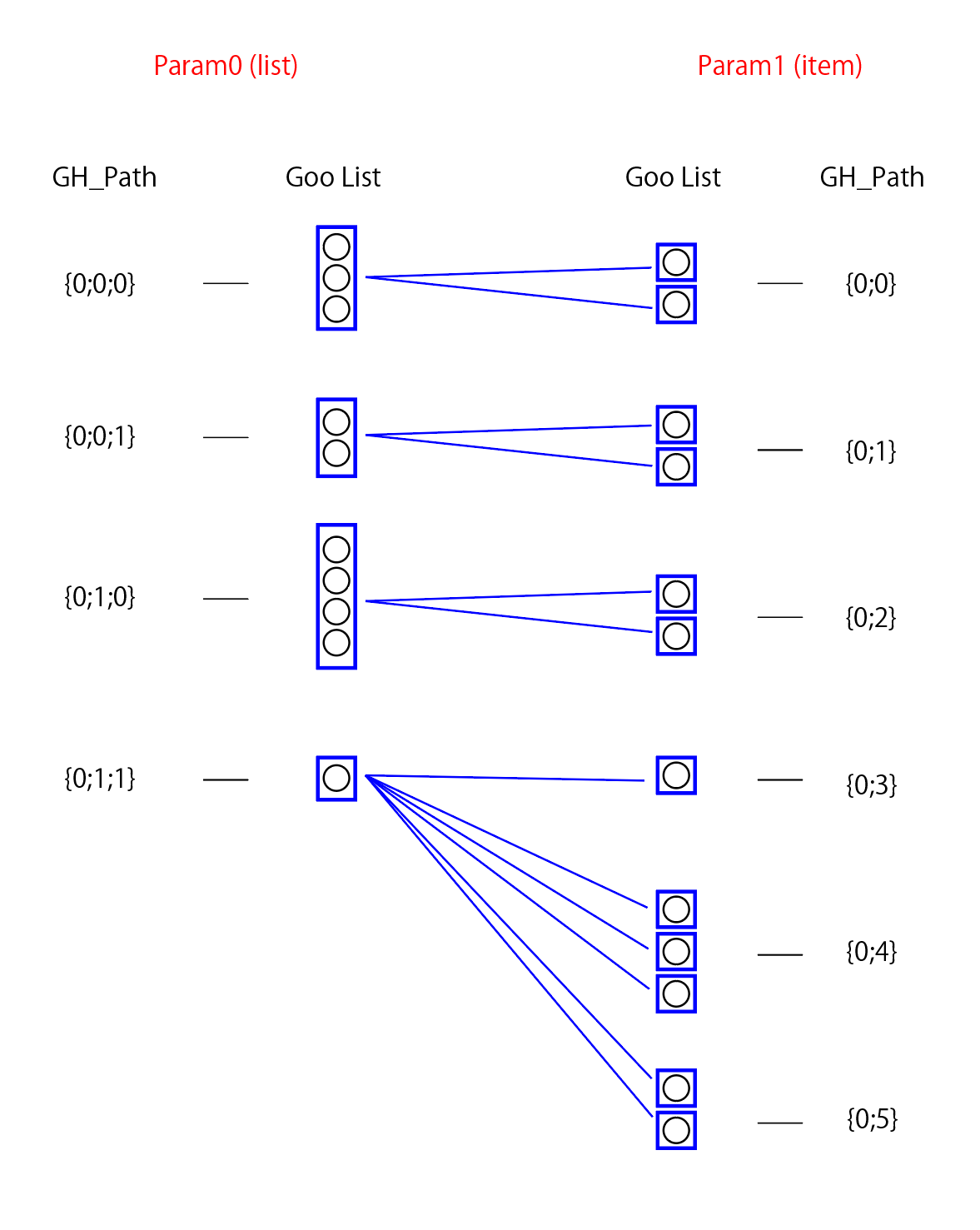
左右をつなぐ青線ごとにSolveInstanceが走り、結果が出力されます。
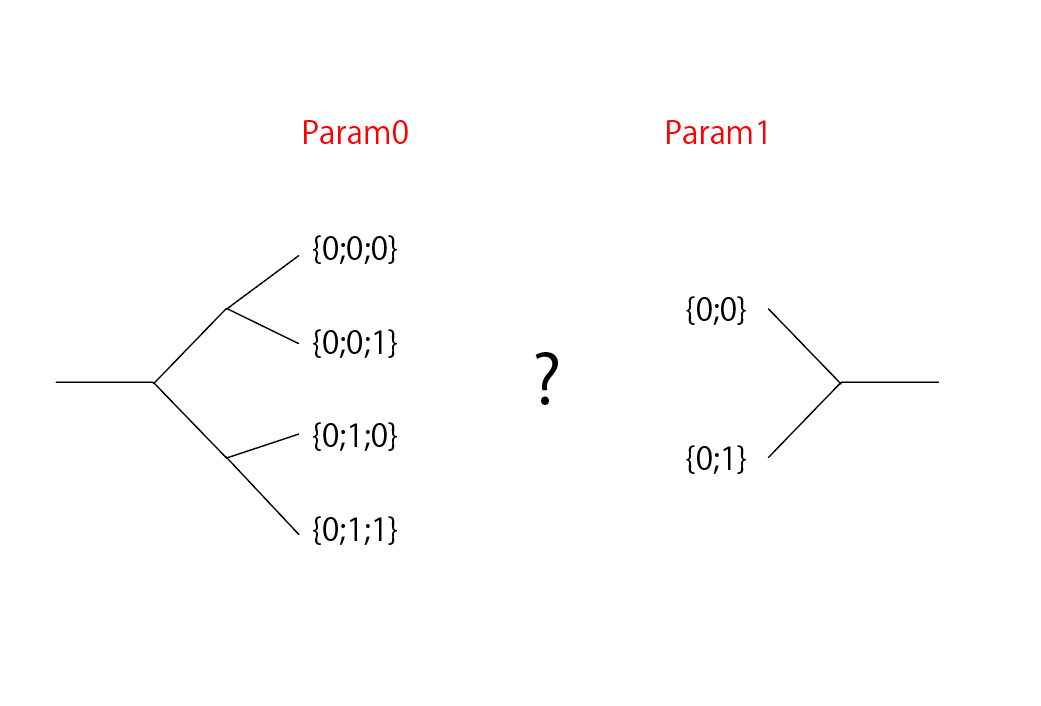
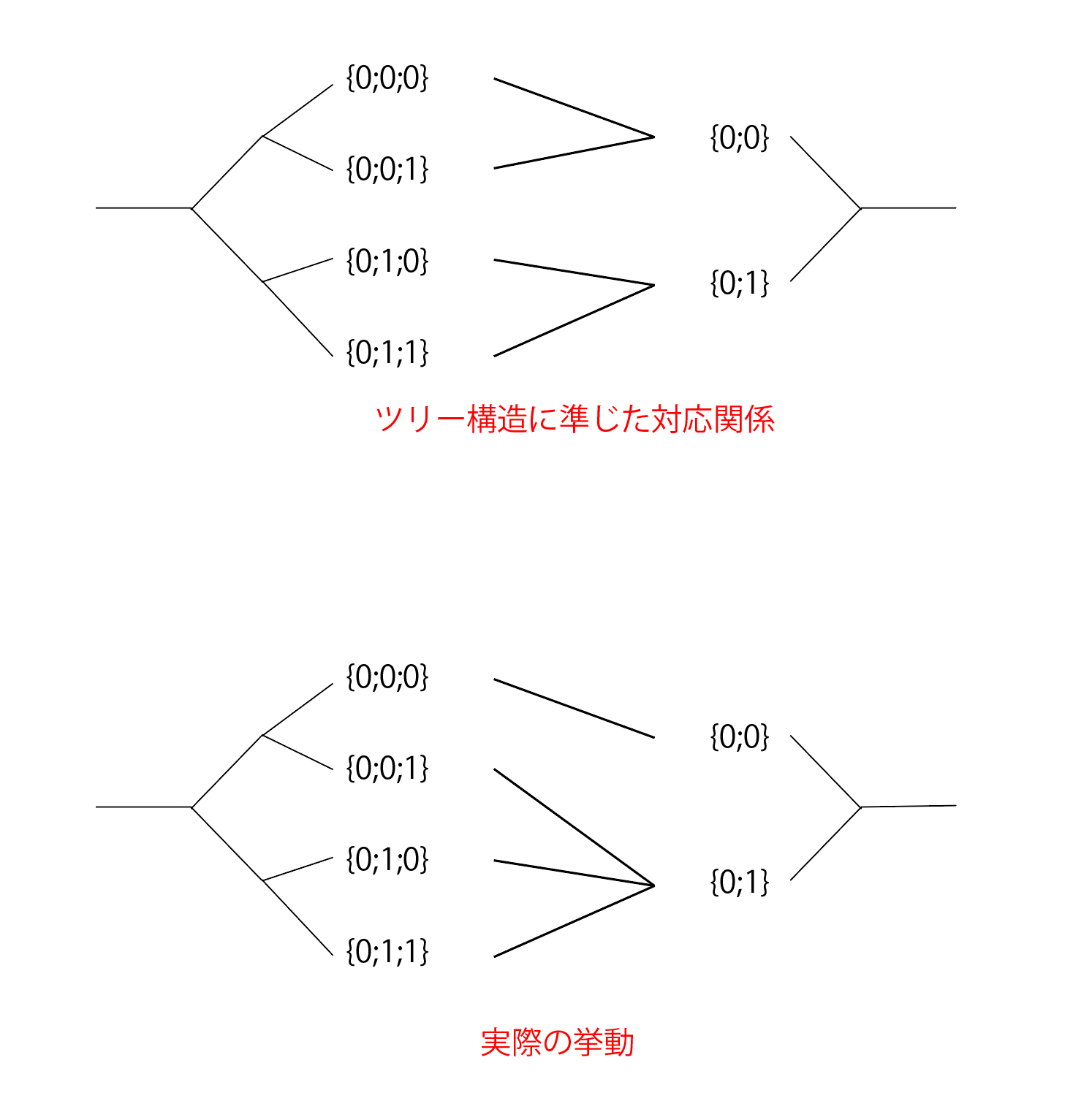
処理の対応関係にTree構造は関係ない
上記ルールを見て頂いて分かると思いますが、GH_Pathはあくまでブランチをソートするキーとして働いています。
整数の組みであるためツリー構造としての可視化や説明が公式含め多く行われていますが、例えば下のようなセットアップではツリー構造に準じた対応関係を期待してしまいますが、そうはなりません。
GH_Structureとの付き合い方
前述したような処理ルールを理解していれば、目的とする処理を実現するために必要なのは正しい構造のGH_Structureを作成したうえでコンポーネントに入力することのみです。
GrasshopperではデフォルトでGH_Structure操作のコンポーネントが多く提供されているほか、TreeSlothなど便利なアドオンも公開されています。
再帰処理を用いて定義されるアルゴリズムをGH_Structureのハンドリングで実現するのには慣れが必要ですが、慣れると各Paramのデータアクセス設定と入力するGH_Structure構造で多様な処理を実現することが出来ます。
次章以降で触れるC#でのComponent開発においては、コンポーネント内の処理ではもちろん如何様にも再帰処理が書けるのでご安心ください。
おすすめの学習コンテンツ
本章で触れたような原理さえ理解していれば、あとは習熟した方々のGrasshopperファイルや動画を見て写経するなどが効率的かと思います。
大量の素晴らしい動画やブログが公開されているのでコンテンツには困りません。
また、Rhinoと同様公式のForumとFood4Rhinoは必須です。
UIの見方から基本操作まで、ゼロからの入門に良いです
コンテンツが豊富です
自分が悩むことは大抵ここで一度は質問されています。英語で質問すれば強い方や開発者から即答されたりします
様々な資産が活発に共有されています。
丁寧かつ発展的な内容も含んでおり、何よりかっこよくてモチベーションの上がる例が多く載っている書籍です
さいごに
実装を始めるための前置きが長くなっていますが、本章では、Grasshopper周りの開発のために有用な知識の概説を行いました。この辺りの理解があるとGrasshopperの利用及びアドオン開発がよりスムーズになります。
次章では、本章で扱ったGoo,Paramの拡張を含めたGrasshopperアドオン開発について入っていければと思います。
Introduction
This article will consist of about 3~4 chapters, assuming the following readers
- who are interested in Rhinoceros+Grasshopper
- who want to deepen their understanding of internal processing when using Rhinoceros+Grasshopper
- who want to use Rhinoceros+Grasshopper for their own extension for business, research, hobby, etc.
- who want to design and play with metamaterials
The purpose of this article, the second chapter, is to understand the parts of Grasshopper that you should understand but do not see comprehensively explained (from the big picture to the internal processing) in order to extend Grasshopper on your own.
There are many excellent learning contents out there, so we will mainly explain the basics in depth on the assumption that you can refer to those contents.
Since we will be talking about something close to implementation, it will be easier to read if you know some programming language, preferably C#.
What is Grasshopper?
Rhinoceros is a 3D CAD as mentioned in the previous chapter, and Grasshopper is a plug-in that comes with it by default.
Using a visual programming environment called the Node Editor, it is possible to achieve complex/advanced processing controlled by programs, which is difficult to do with Rhino alone.
The node editor is a visual programming environment that allows for complex/advanced processing controlled by a program, which is difficult to achieve with Rhino alone.
What does Grasshopper make happy?
The joys of using Grasshopper are many and varied, but we often see people who are reluctant to learn Grasshopper because they don't understand what actually makes them happy (or they see a strangely complicated UI screencast, etc.).
I will try to break down the elements as much as possible and introduce them to you.
Complex processing can be achieved with no code!
The node editor itself is explained in the Wiki, but in addition to being a node editor, the detailed specifications described below make it possible to realize complex processing without writing a program.
While its unique data structure and algorithms make it possible to build intuitive and complex processes, its side effect is that it is uniquely difficult to understand, and overcoming this is a barrier to learning.
One point to note is that Grasshopper does not allow loops in node connectivity, so recursive processing is not directly possible (!). However, the data structure and processing rules described below allow for processing that is equivalent to recursive processing.
Parametric processing construction is possible!
As mentioned in the previous section, Rhino is a CAD system that does not have a history in principle, so it is not possible to change the parameters of a process that has been performed in the past.
In Grasshopper, on the other hand, a network of processes with parameters is created, so that each time a parameter is updated, the process is executed again with the updated parameters.
The kind of precise geometry editing that is done interactively in Rhino is not suitable for Grasshopper (although it can be done with a great deal of effort),
- Geometry study in the verification phase
- Shape generation with optimization in mind
However, Grasshopper is very powerful for applications where you want to change parameters after the fact, such as shape study during the verification phase, shape generation for optimization, etc.
Can handle high volume/complex processing!
By default, most of the individual operations that can be performed by Grashopper can also be performed on Rhino.
So, is it possible to do something like "create a circle with radius r0+0.1*i at each point p_i obtained by dividing a given curve into n equal parts" by hand in Rhino?
I can do this by running the Circle command n+1 times, increasing the radius by 0.1 after getting n+1 points from the Curve with the Divide command.
In Grasshopper, this can be done with as few as four components, and each variable can be changed later. The same is true for more complex examples. Glad to hear it.
Easy reuse of assets!
Grasshopper provides a mechanism to define inputs and outputs for a series of processes or files you create, making them reusable as nodes.
This is useful for team collaboration and modularization of frequently used processes.
Extensibility, active community
As with Rhino in the previous chapter, flexible extensibility is ensured, and various assets are actively disclosed in communities such as Forum and Food4Rhino.
Various extensions are possible with add-ons that are basically developed in C#, and external libraries can also be used.
In addition, because Grasshopper is built by combining nodes, a variety of applications across industries and technical domains are being created daily by combining add-ons.
Understanding Grasshopper
Understanding Grasshopper (1): Basic Components
In order to understand the processing taking place in Grasshopper, it is important to understand
- Goo
- Param
- Component
In a nutshell, Grasshopper is
- A Goo that holds data.
- Goo is passed through Param, which can hold the Goo in a certain data structure, while
- Component executes the process.
I will explain the three.
Understanding these three functions and their relationship should give you an idea of the overall picture of the processing that takes place in Grasshopper.
Goo
GH_Goo<T> and GH_ GeometricGoo<T> and other IGH_ Goo<T>, which inherit from abstract classes that implement interfaces, By implementing a Goo class that specifies the type T to be handled within Grasshopper, it functions as a wrapper class for type T that provides functionality for handling within Grasshopper.
The functions that Goo has are as follows.
- Functionality for holding and externally accessing type T values.
The values GH_Goo and GH_GeometricGoo hold values of the type specified by generics in the m_value field, which can be accessed with the Field property. - Interconversion functionality with other Goo and classes.
The CastTo and CastFrom methods can be implemented to provide type conversion functionality between different Goo This allows Grasshopper to provide type conversion functionality between different Goo types.
This allows Grasshopper to build processes without explicitly being aware of the need to convert between different types.
(e.g., even if you connect an integer value to an input port that expects a double value for a component, internally GH_Intger(GH_Goo<int>) is converted to GH_Number(GH_Goo<double>) via the CastTo method) - Shape transform function (GH_GeometricGoo<T>).
Rhino and Grasshopper perform many shape transformations, including affine transformations.
Transform method and Morph methods by implementing them, By implementing the [Transform]() and [Morph]() methods, it is possible to make geometry data that is not supported by default compatible with Rhino and Grasshopper's various geometry transformation functions.
Param
GH_Param<T> and GH_PersistentParam<T >, [IGH_Param<T>](https:// developer.rhino3d.com/api/grasshopper/html/T_Grasshopper_Kernel_IGH_Param.htm), which inherits from an abstract class that implements an interface (T is constrained to Goo) and can be used by one or more It holds one or more Goo in a data structure called GH_Structure<T>. The main function is to hold one or more Goo in a data structure called [GH_Structure<T>] () and pass it from one component to another.
It is non-intuitive, but everything circled in red in the image is a Param, which is handled in the UI in the following ways
- Floating: The UI itself has inputs and outputs just like a component and passes goo to and from it.
- Input: Serves as an input port for the Component and passes Goo to and from it
- Output: Functions as an output port of the component and passes goo to and from it
There are three types of Input and Output. Basically, there is no problem in understanding that they function as Input and Output.
Component
This is a node in the node editor and is basically implemented by inheriting from the GH_Component class. It is implemented by inheriting from the [GH_Component]() class. It is a node in the node editor, basically implemented by inheriting from the SolveInstrance class, which is a real processing method that combines the information passed from the input Param with the appropriate combination. Component_SolveInstance.htm) and passes the processing results to the output Param with an appropriate data structure.
Understanding Grasshopper (2): Processing Flow and GH_Structure
The biggest hurdle in learning Grasshopper is often said to be the data structure used to hold information in Param, [GHStructure<T>](https://developer.rhino3d.com/api/grasshopper/html/T Grasshopper_Kernel_Data_GH_Structure_1.htm), and this data structure and certain rules determine the behavior of the Component.
Basically, it is often explained by likening it to a tree structure such as DataTree, but I personally think there are misunderstandings and difficulties in understanding due to this, so I will try to give a concrete explanation closer to the internal process.
What is GH_Structure?
First, in a nutshell, GH_Structure is "like a dictionary ordered by GH_Path that holds a list of Goo's with GH_Path (multiple integer values like {0;0;1}) as the key.
GH_Path can be ordered by comparing large and small values, starting with the integer value on the left.
Example: {0;0;0} < {0;0;1} < {0;1;0} < {1;0;0}
Handling of GH_Structure within Component
Component is the same as each input Param's
- GH_Structure
- Data access settings (see below for details)
- item: Passes one Goo in GH_Structure to SolveInstance
- list:List of Goo corresponding to one GH_Path in GH_Structure is passed to SolveInstance
- tree: GH_Structure itself is passed to SolveInstance
Based on the "GH_Structure", the SolveInstance method decides what combination of input values to execute based on a certain rule, processes it, and outputs the result.
The rule is as follows (I describe item and list because the data access case of tree is simple and not so common). There are several ways to explain this, but I will try to make it easy to understand and avoid misunderstandings.
**Assumptions
- The GH_Structure of each input Param holds a list of Goo's (this list of Goo's is called a branch for convenience) with GH_Path as the key, which is sorted in ascending order by GH_Path.
- Each input Param has its data access settings set to item or list.
- Each input Param may have different number of branches (= number of key GH_Paths) and number of items in the branch.
(1) Mapping between branches of GH_Structure of each input Param.
Take the nth branch from each GH_Structure. If the number of branches is less than n, the last branch is taken. For convenience, we refer to this as a branch set.
As a result, a branch set is defined for the number of branches in the GH_Structure with the largest number of branches.
②Divide the Goo in the branches into units to be passed to SolveInstance.
For each branch in the branch set, "If the data access is list, the processing unit is the list of all Goo's in the branch. If data access is item, each Goo in the branch is the processing unit.
As a result, in the case of a list, one processing unit is created, but in the case of an item, a processing unit is created for the number of elements in the branch.
3) Correspondence between processing units.
Now that the branch set has been defined, a processing unit has been defined for each branch in the branch set. In contrast to this,
The nth processing unit is taken from each branch. If the number of processing units in a branch is less than n, the last processing unit is taken.
This rule is used to match the processing units. This combination becomes the value combination passed to SolveInstance.
Example of the entire process
SolveInstance is run for each blue line connecting the left and right sides, and the result is output.
The Tree structure is irrelevant to the correspondence of the processes.
As you can see from the above rule, GH_Path only works as a key to sort branches.
Since GH_Path is a set of integers, it is often visualized and explained as a tree structure, including official ones, but in a setup like the one below, for example, you would expect the correspondence to follow a tree structure, but it does not.
How to deal with GH_Structure
If you understand the processing rules as described above, all you need to do to achieve the desired processing is to create a GH_Structure with the correct structure and input it into the component.
Grasshopper provides many components for GH_Structure operations by default, and also publishes useful add-ons such as TreeSloth.
It takes some getting used to realize algorithms defined using recursive processing with GH_Structure handling, but once you get used to it, you can realize a wide variety of processing with each Param's data access settings and input GH_Structure structure.
In C# component development, which will be discussed in the next chapter, you can of course write recursive processing in any way you like within the component.
Recommended learning contents
If you understand the principles mentioned in this chapter, it would be efficient to learn by watching and copying Grasshopper files and videos of people who have mastered the language.
There are a large number of excellent videos and blogs available, so there is no shortage of content.
As with Rhino, the official Forum and Food4Rhino are essential.
- HIROSHIMA DESIGN LAB - Introduction to Grasshopper](https://www.youtube.com/watch?v=Wm7-8eJzxXU&list=PLPnyFn_afm-iXUYKgMoa1isoEwrFgjOi3)
Good for an introduction to Grasshopper from scratch, from how to look at the UI to basic operations.
- Official Tutorials](https://www.grasshopper3d.com/page/tutorials-1)
It has a lot of contents.
- Rhinoceros Forums](https://discourse.mcneel.com/)
Most of the things I have problems with have been asked here at least once. If you ask a question in English, you will get an immediate answer from a strong person or developer.
Various assets are actively shared.
- Parametric Design with Grasshopper, Revised and Updated, The Grasshopper Cookbook for Architecture/Products 2%97%E8%A3%9C%E6%94%B9%E8%A8%82%E7%89%88-%E3%83%97%E3%83%AD%E3%83%80%E3%82%AF%E3%83%88%E3%81%AE%E3%81%9F%E3%82%81%E3%81%AE%E3%80 81Grasshopper%E3%82%AF%E3%83%83%E3%82%AF%E3%83%96%E3%83%83%E3%82%AF/dp/4802511213/ref=sr_1_1?__mk_en_JP=%E3%82%AB%E3%82%BF%E3%82 AB%E3%83%8A&crid=JBBV0I3M68Z8&keywords=grasshopper&qid=1680747916&sprefix=grasshoppe,aps,158&sr=8-1)
This book contains careful and developed content, and most importantly, it contains many cool and motivating examples!
Conclusion
Although this is a long preamble to start the implementation, this chapter has provided an overview of useful knowledge for development around Grasshopper. An understanding of this area will make the use of Grasshopper and the development of add-ons much smoother.
In the next chapter, we will discuss Grasshopper add-on development, including the Goo and Param extensions covered in this chapter.
